Key Takeaways
- BadUSB attacks evade antitrust detection by exploiting USB firmware to mimic trusted devices.
- Once connected, they can quickly execute commands, steal data, or reroute traffic.
- Prevention methods include strict USB policies, disabling unused ports, and detecting abnormal keystrokes.
Lurking beneath the convenience and everyday nature of USB devices is a sophisticated cybersecurity threat known as BadUSB.
BadUSB is a type of attack that leverages the reprogrammable firmware in USB devices (e.g., flash drives, keyboards, charging cables) to carry out malicious actions. Unlike traditional malware, which lives in the file system and can often be detected by antivirus tools, BadUSB lives in the firmware layer.
Here’s why security professionals consider BadUSB attacks a growing threat:
- Plug-and-play nature — Users often trust USB devices implicitly, plugging in unknown or giveaway drives without a second thought.
- Mass exploitation potential — Cybercriminals can distribute compromised USBs at events, in mail or even leave them in public places for victims to find and use.
- Difficult to detect — Since the malware is embedded in the USB’s firmware, it bypasses most traditional antivirus and endpoint protection tools.
Once connected to a computer, a BadUSB device can:
- Emulate a keyboard to type malicious commands.
- Install back doors or keyloggers.
- Redirect internet traffic.
- Exfiltrate sensitive data.
How BadUSB attacks work
BadUSB gained public attention in 2014 when researchers Karsten Nohl and Jakob Lell demonstrated at Black Hat USA that USB firmware could be reprogrammed for malicious use — undetectable by operating systems. They also revealed that most USB controllers lacked firmware authenticity checks, a vulnerability likely exploited by intelligence agencies like the NSA long before the public disclosure.
Since BadUSB attacks manipulate a USB device’s firmware (the low-level code that controls how the device communicates with your system), understanding how a BadUSB attack unfolds is key to recognizing its severity and enacting safeguards.
Below are three crucial aspects of BadUSB attacks to familiarize yourself with so you can eliminate this potential vulnerability:
- Reprogramming USB firmware
- Masquerading as trusted devices
- The timeline of a BadUSB attack
Reprogramming firmware to turn USB devices into cyber weapons
The ability to reprogram the firmware on USB devices (such as flash drives, keyboards, mice or network adapters) is at the heart of a BadUSB attack. Many USB controllers, especially older or inexpensive ones, allow people to rewrite their firmware without any authentication or digital signature checks.
Once compromised, the USB device no longer behaves as its label suggests. Instead, it becomes a covert cyber weapon. Because firmware operates below the operating system level, traditional security tools cannot scan or detect these alterations.
Masquerading as trusted devices to avoid detection
One of the most dangerous aspects of BadUSB is device impersonation. Here are two of the most common disguises:
- Keyboard emulation — A USB flash drive can be used as a keyboard (a trusted device type), then inject keystrokes that launch PowerShell or Command Prompt to download and execute malware — just as if a user were typing the commands manually.
- Network adapter spoofing — The USB can pretend to be a network interface controller (NIC). Once connected, it can reroute your internet traffic through a malicious server, perform man-in-the-middle (MITM) attacks or intercept sensitive data, like login credentials.
Timeline of a BadUSB attack: From plug-in to payload
Here’s a simplified timeline of how a BadUSB attack can unfold:
- Device insertion (0 seconds) — The user inserts the malicious USB device into their computer, expecting it to be a harmless flash drive, charging cable, etc.
- Enumeration (0–2 seconds) — The device introduces itself to the operating system; not as a flash drive, but as a keyboard or network card.
- Payload Execution (2–5 seconds) — When emulating a keyboard, the device begins typing commands silently in the background. When emulating a network adapter, it reconfigures the system’s DNS or routes traffic through a malicious proxy.
- Post-Exploitation (5 seconds and beyond) — Depending on the attack goal, the device may:
- Download and install back doors.
- Steal files or login credentials.
- Grant remote access to an attacker.
- Spread across the internal network.
Because this all happens within seconds, and without any antivirus alert or user prompt, a BadUSB attack can compromise a system before the user even realizes what happened.
Real-World BadUSB attack techniques
From Pavement to Breach: How a Forgotten USB Could Cripple a Government Network
What happened
Researchers conducted experiments by deliberately dropping USB drives in public areas, such as parking lots, university campuses and conference rooms to observe user behavior. According to G DATA, an overwhelming 98% of these abandoned drives were picked up and at least 45% were plugged into computers to inspect their contents.
Similarly, a study by Elie Bursztein and his team found that 48% of people who discovered a USB drive — regardless of the location — went on to plug it in. These findings highlight the significant risk posed by seemingly innocuous USB devices, driven largely by human curiosity or helpful intent.
What made it a BadUSB scenario
The USBs were crafted as malicious HID (Human Interface Device) implants (i.e., they weren’t carrying malware files but emulated keyboards that auto-typed attack commands once connected). They exploit user trust: no scanning by antivirus or clicking was required—the act of plugging the device in was enough to trigger the attack.
Key industry lessons from the study
- Social engineering is still incredibly effective
- The studies confirmed that attackers don’t need advanced zero-day exploits when they can rely on human psychology. Curiosity, helpfulness, or even the assumption of lost property can be weaponized.
- Traditional security measures aren’t enough
- Most endpoint protection tools scan for malware, but BadUSB attacks use keyboard emulation, bypassing antivirus and software-based defenses entirely. This showed a critical blind spot in endpoint security.
- Air-gapped systems are not immune
- The fact that some USBs were plugged into secure or air-gapped environments was especially concerning. It shattered the illusion that physically isolated systems are inherently safe, and highlighted the importance of physical security and insider awareness.
- Need for stronger device control policies
- These results pushed many organizations to re-evaluate their USB and removable media policies. Tools like Ivanti Device Control became more relevant, offering the ability to allow, block, or restrict specific device classes.
- Emphasis on user awareness and training
- The studies reinforced the necessity of employee education. Users must be trained to treat unknown devices as potential threats and understand that “plugging in to help” could lead to catastrophic outcomes.
- Policy meets technology
- The takeaway wasn’t just technological. It prompted organizations to develop clear security policies around removable media, improve logging, and enforce stricter controls for physical access.
Rubber ducky attacks
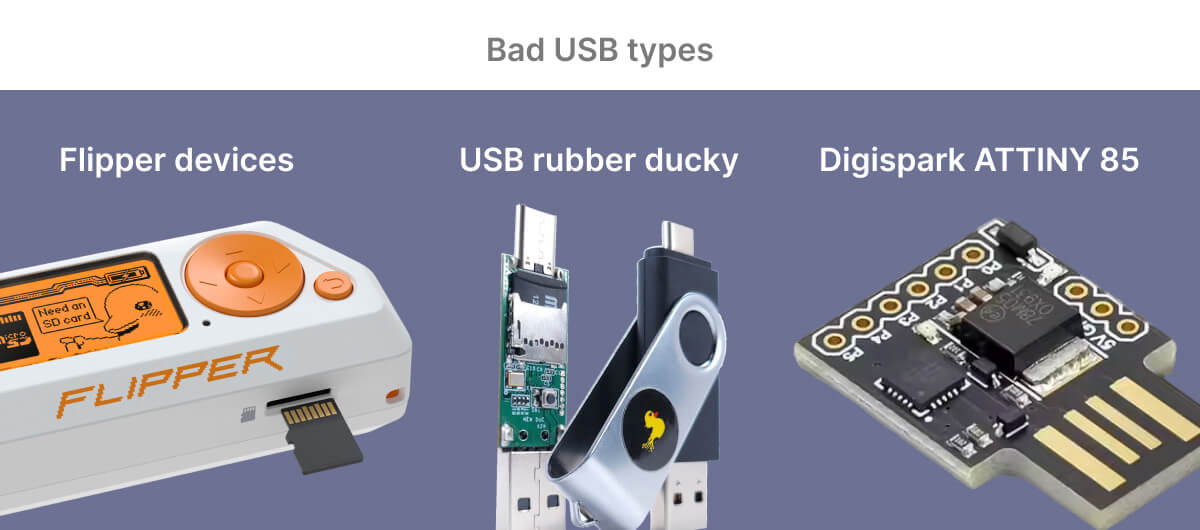
Rubber ducky attacks refer to a type of cyberattack where an attacker uses a malicious USB device, often disguised as a harmless USB flash drive (called a rubber ducky), to compromise a computer system.
Key points about rubber ducky attacks
- Device type – Looks like a standard USB drive but functions as a Human Interface Device (HID), like a keyboard.
- Working principle – When plugged in, the Rubber Ducky emulates a keyboard and rapidly types pre-programmed keystrokes to execute commands on the target system.
- Payloads – These could include:
- Opening a command prompt and downloading malware
- Creating new user accounts
- Disabling security features
- Exfiltrating data
- Speed – Executes commands far faster than a human could type, usually completing an attack in seconds.
- No authentication required – Most systems automatically trust HID devices without user authorization.
Common mitigation measures
- Implement workstation lock policies when unattended.
- Apply the principle of least privilege—prevent users from having local admin rights.
- Educate employees on not leaving workstations unlocked and the risks of unknown USB devices.
- Physical security (USB port locks, CCTV, and awareness).
Why traditional security solutions don’t detect BadUSB attacks
Despite the ever-evolving cybersecurity landscape, BadUSB remains a stealthy and largely undetectable threat. Most traditional security solutions are simply not designed to monitor what happens at the firmware level of USB devices.
USB whitelisting limitations
Some organizations implement USB whitelisting, allowing only approved devices to connect to corporate systems. While this is a solid first step, it doesn’t protect against devices that masquerade as something they’re not doing.
For example:
- A whitelisted USB flash drive could be reprogrammed to behave like a keyboard.
- USB devices with dynamic identities can bypass static whitelists by switching their declared class mid-connection.
Since the operating system identifies devices based on what they say they are — not what they contain — a malicious device can trick even well-maintained whitelists.
Firmware-level reprogramming vs. traditional malware
Feature |
Firmware-Level Reprogramming (e.g., BadUSB) |
Traditional Malware |
|---|---|---|
Operating level |
Operates at the firmware level (below the OS). Modifies device firmware (e.g., USB controller firmware). | Operates at the software level within the OS. |
Location |
Lives outside the file system. | Resides within files, processes, or other OS components. |
Detection |
Cannot be detected by software-based scanners (antivirus, EDR). Rarely (if ever) validated by traditional monitoring systems. | Detectable by antivirus programs and EDR tools (scanning files, processes, network traffic, known signatures/behaviors). |
Payload requirement |
Does not require a stored payload. | Typically relies on stored payloads (malicious files). |
Digital footprint |
Performs attacks without leaving a digital footprint in traditional monitoring systems. | Often leaves a digital footprint that can be traced by security tools. |
Trust exploited |
Exploits the fundamental trust computers place in hardware devices (e.g., USB devices). | Exploits software vulnerabilities, user actions, or misconfigurations. |
Defense |
Requires hardware-aware policies, physical port control, and user education. | Relies on software defenses like antivirus, EDR, firewalls, and patching. |
BadUSB attack prevention: Best practices
As BadUSB attacks continue to bypass traditional security tools, organizations must shift toward proactive, layered defense strategies. Fortunately, there are effective prevention methods that can minimize or eliminate risks, including:
- Policy-based USB access control
- Blocking unused USB ports
- Keystroke behavior monitoring
- Restricting access to elevated command prompt or PowerShell
- Application control
1. Policy-based USB access control
The first line of defense is to establish strict, policy-driven USB access across your organization. This means defining exactly which devices can connect to which systems and blocking all others.
Key strategies include:
- Blocking USB device classes that should never be used, such as HID (keyboard/mouse) on servers or point-of-sale systems.
- Applying role-based restrictions to ensure that only authorized employees can use removable media.
By implementing these policies through centralized management, organizations can effectively prevent unknown threats. For businesses that require scalable, enterprise-level protection, device control solutions such as Ivanti Endpoint Manager (EPM) and Ivanti Device and Application Control (IDAC) offer robust security and management capabilities.
2. Block unused USB ports to eliminate attack entry points
One of the simplest yet most effective strategies to prevent BadUSB attacks is to physically or logically disable unused USB ports. If a port isn’t needed for business-critical functions, you should deactivate it to: Reduces the attack surface by limiting opportunities for unauthorized devices to connect.
- Prevents users from accidentally (or intentionally) plugging in malicious USB devices.
- Supports compliance with security frameworks that require strict endpoint control.
To implement this security protocol:
- Use BIOS/UEFI settings to disable USB ports at the hardware level.
- Leverage endpoint management tools (like Ivanti EPM) to block USB ports through policy.
- Apply physical port blockers for high-security environments where tamper-proofing is essential.
By eliminating open and unmonitored USB ports, you can dramatically reduce the risk of drive-by BadUSB infections and maintain tighter control over endpoint security for your entire organization.
3. Detecting BadUSB with keystroke behavior
BadUSB attacks often use HID (Human Interface Device) spoofing to inject commands via simulated keyboard inputs. These keystrokes happen at inhuman speeds — far beyond what any human user could produce.
For example, a malicious USB might type a full PowerShell command in less than a second after being plugged in. By monitoring typing speed, timing patterns and command structures, security software can flag and respond to suspicious input activity before damage occurs.
Even so, one of the major disadvantages of keystroke behavior monitoring is that skilled attackers can slow down payload delivery to mimic human typing speeds and potentially evade detection.
4. Restrict access to elevated command prompt or PowerShell
BadUSB devices are dangerous not just because they connect to a system, but because they execute high-privilege commands almost instantly. One of the most common tactics is launching an elevated command prompt or PowerShell window to run malicious scripts, download payloads, or modify system settings.
By restricting access to administrative command-line tools, you can effectively neutralize the payload execution stage of many BadUSB attacks — even if the device successfully connects.
Implementing Just-in-Time (JIT) Privileged Access for command prompt and PowerShell is an excellent way to minimize attack windows while still allowing necessary administrative activity.
5. Deploy application control to mitigate BadUSB risks
Application control is a security approach that only allows approved and verified applications to be executed within a system or network. Instead of trying to identify and block bad behavior, it whitelists only known good behavior.
More specifically, application control helps you:
- Block unauthorized executables — BadUSB attacks often try to launch scripts or applications upon connection. Application control ensures that only whitelisted executables are allowed to run, immediately halting the attack before it can escalate.
- Prevent unauthorized code execution — If a BadUSB device tries to emulate a keyboard and inject keystrokes to open PowerShell or command prompt, application control can prevent these programs from executing (unless they are specifically allowed).
- Implement hardware-aware policies — Some advanced application control solutions can implement device-specific policies (e.g., blocking all keyboard-like inputs from unknown USB vendors, restricting USB ports to charge-only functionality).
- Reduce attack surfaces — By strictly controlling what software is allowed, even if a Bad USB bypasses physical protections, its ability to interact with the system is extremely limited.
How Ivanti Endpoint Management and Ivanti Device Application Control help prevent BadUSB attacks
Grant temporary (just-in-time) access to the USB devices only when necessary. Initially, a complete block — such as targeting tools like the flipper device — was considered. However, after evaluating feasibility and business impact, this approach was determined to be too restrictive.
Instead, Ivanti Endpoint Management and Device Application Control provide a more flexible solution. They help mitigate BadUSB threats by allowing controlled device access and applying the right security policies. This approach balances protection with productivity, reducing risk without hindering legitimate use.

Conclusion: Why BadUSB Awareness Matters
As cyber threats continue to get more sophisticated, awareness is your strongest first line of defense. BadUSB attacks represent a unique and underestimated vulnerability — one that bypasses traditional defenses by exploiting the inherent trust most people place in USB devices. Without awareness and proactive control, even the most secure networks can fall victim to a single compromised USB device.
Unfortunately, most organizations don’t fully monitor or control how these devices are used, leaving a massive blind spot in their security infrastructure. Implementing a clear USB security policy — along with the right tools to enforce it — is no longer optional. It’s essential.
Trust Ivanti for BadUSB attack prevention and superior device control
Organizations serious about mitigating USB-based threats should consider leveraging comprehensive device control solutions like Ivanti Endpoint Manager (EPM) and Ivanti Device Application Control (IDAC).
Ivanti’s solution addresses all the key application controls recommended to defend against threats like BadUSB offering granular USB access controls to block or allow specific device types, real-time monitoring and reporting of USB activity across all endpoints, and automated policy enforcement that ensures compliance across departments and regions. These capabilities integrate seamlessly with broader endpoint protection strategies, preventing unauthorized devices from ever reaching sensitive systems. But Ivanti goes beyond these foundational controls with context-aware policy enforcement, allowing organizations to dynamically adjust USB access based on real-time risk signals such as user behavior, location, and device trust — providing intelligent, adaptive protection in an ever-evolving threat landscape.
BadUSB is not science fiction—it’s already happening. Educating your team, enforcing USB access policies, and leveraging tools like Ivanti can mean the difference between resilience and breach. Don’t wait for a compromised device to remind you of the risks. Take control now.
FAQ
What is a BadUSB attack?
A BadUSB attack takes advantage of reprogrammable firmware in USB devices, masquerading trusted devices such as keyboards or network adaptors to execute malicious actions.
How does a BadUSB attack differ from traditional malware?
Traditional malware operates within the file system and can be detected by antivirus software. BadUSB attacks modify the firmware of USB devices, which makes them extremely difficult to detect with standard security tools.