Key Takeaways
- Ivanti Application Control uses Trusted Ownership, a provenance-based model that controls execution based on how software arrived on the system rather than managing lists of allowed or blocked files.
- The Trusted Ownership approach provides broad coverage across executables, DLLs, scripts and MSI packages by applying the same-origin-based enforcement to the full execution chain, blocking user-introduced content by default.
- Trusted Ownership reduces operational overhead compared to traditional allowlisting methods like AppLocker, while providing better protection against modern attacks that use legitimate tools in improper contexts.
Application control is one of those security topics where many people carry old assumptions. Traditional allowlisting feels safe but quickly becomes a maintenance burden. Blocklisting feels reactive and incomplete. And while tools like Microsoft AppLocker led many to believe that strict allowlisting is the gold standard, modern attacks have proven otherwise. Attackers increasingly rely on legitimate, signed tools — used in the wrong context — to bypass list-based controls entirely.
So when organizations evaluate Ivanti Application Control or Ivanti Neurons for App Control and encounter Trusted Ownership, it may initially resemble blocklisting because explicit blocks are possible. In reality, Trusted Ownership is a far broader and far lighter operationally inspired‑ enforcement model that controls execution based on origin, not just identity.
Instead of managing expanding lists, it enforces security on who has placed software on the system, aligning cleanly with modern software distribution practices and zero trust principles. It’s best understood not as another list mechanism, but as a provenance inspired enforcement model that controls execution based on origin, not just identity.
That shift in thinking leads to a better question for modern application control: not only what a file is, but how it got there.
Beyond lists: why provenance control now matters
The question of how a file arrived on the system is at the core of provenance control. Instead of trusting files based on publisher, path or hash alone, provenance control evaluates the origin and process that introduced them. Who wrote the file to disk? Through which mechanism? Did the installation follow a controlled IT workflow? This evaluation shifts application control from object trust to process trust, creating a far stronger security boundary.
In Ivanti Application Control, provenance control is implemented as Trusted Ownership. Any file placed by a trusted owner is allowed; anything introduced by a user is denied by default. This applies consistently across executables, DLLs, installers and scripts. Because identities like SYSTEM, TrustedInstaller and Administrators are trusted by default, software delivered through standard deployment channels such as MS Intune, MECM, Ivanti Endpoint Manager (EPM)or other enterprise tools runs immediately without rule maintenance or exceptions.
This marks a fundamental break from classic allowlisting. AppLocker rules live or die based on exact publisher, path or hash definitions. It doesn't evaluate installation origin and doesn't automatically trust your deployment mechanisms. Software delivered by Intune still requires a preexisting allow rule, often relying on broad defaults that permit the Program Files or Windows directories.
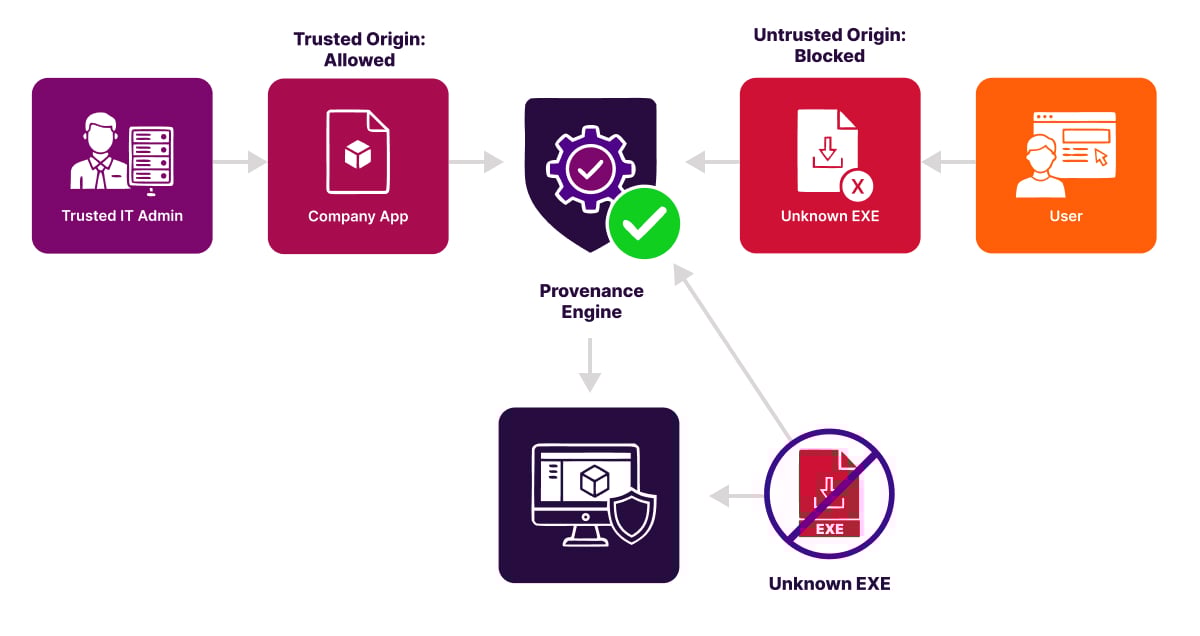
That distinction matters because modern attacks increasingly weaponize legitimate tools in improper contexts. Provenance control neutralizes much of that risk by enforcing trust in how software arrives, not just what it is. It aligns with zero trust principles, reduces supply chain exposure, and dramatically narrows opportunities for Living off the Land (LotL) abuse by default.
Once you understand the importance of origin, the next question becomes: how do you enforce it at scale?
The answer: apply provenance consistently across all the ways software executes and all the ways it is delivered.
Beyond Blocklists: Broad coverage built for modern software deployment
Provenance control shifts application security away from managing endless lists and toward validating the process by which software arrives on the system. Once you adopt this perspective, it becomes clear that Trusted Ownership is not a blocklist approach. It's an origin-based trust boundary that behaves very differently from traditional allowlisting.
A common misconception is that Trusted Ownership resembles blocklisting because administrators sometimes add targeted deny rules for well-known Windows tools. In practice, these deny rules are defensive hardening measures against Living off the Land techniques. Every serious application control method uses such targeted restrictions. The core of Trusted Ownership is the opposite of blocklisting. Software delivered through a controlled and trusted process is permitted by default, while user-introduced content is denied by default.

A more important differentiator is coverage. Many organizations that rely on classic allowlists end up focusing almost entirely on executable files. They often avoid applying the same enforcement to DLLs, scripts and MSI packages because these file types make rule maintenance far more complex. This creates gaps that modern attackers frequently exploit.
Trusted Ownership avoids these gaps by applying the same origin-based enforcement to the full execution chain. Executables, DLLs, scripts, MSI installers and related components are evaluated through the same trust model. Because trust is determined by who introduced the file, you do not need separate policies for each file type. A script in the Downloads folder, a DLL created in a temporary build directory or an EXE executed from a user profile all receive the same default deny treatment when they originate outside a controlled installation process.
This trust model also aligns naturally with how modern endpoint management platforms deliver software. Solutions such as Intune, MECM, Ivanti Neurons for MDM, Ivanti Endpoint Manager and similar systems typically install applications using the SYSTEM identity or another trusted service account.
Since these identities are already Trusted Owners, software deployed through these channels runs immediately without creating allow rules, maintaining file paths or updating policies. Only when you intentionally use alternative installation accounts, such as custom DevOps agents or scripted installations in user context, do you need to identify that identity as a Trusted Owner.
The result is a model with broad and consistent coverage across all relevant file types. It works seamlessly with modern software distributions and avoids the operational overhead associated with classic allowlists that focus mainly on executable files.
Trusted Ownership places trust not in individual objects but in the controlled processes through which software is delivered, creating a more scalable and more secure approach to application control.
Where WDAC (App Control for Business) fits in
Microsoft maintains two application control technologies: AppLocker and App Control for Business (formerly WDAC). Although both still exist, Microsoft is clear about their roles. AppLocker helps prevent users from running unapproved applications, but it does not meet the servicing criteria for modern security features and is therefore categorized as a defense-in-depth mechanism rather than a strategic security control.
Microsoft’s forward path for application control is App Control for Business and explicitly states that AppLocker is feature-complete and no longer under active development, beyond essential security updates. This means all new capabilities are delivered only in WDAC and not in AppLocker.
App Control for Business introduces the Managed Installer concept. This allows Windows to automatically trust applications installed through designated deployment platforms such as Intune or MECM. Trust is derived from the distribution channel rather than individual files, reducing rule maintenance significantly.
This aligns closely with Ivanti Application Control’s Trusted Ownership model. Both approaches trust software based on the controlled process that installed it rather than on discrete file attributes. However, Trusted Ownership applies this concept in a simpler and more operationally accessible way. Ivanti trusts identities such as SYSTEM and designated service accounts without requiring complex policy layers, XML definitions or deep WDAC expertise.
Ivanti hears from many organizations that they struggle to operationalize WDAC. WDAC policies require careful design, lengthy testing in audit mode, driver and kernel exception management and ongoing maintenance of multiple policy sets. This often leads organizations to combine WDAC with AppLocker to cover both low-level enforcement and day-to-day user space control and end up with administrative overhead.
Ivanti Application Control offers a unified alternative. Through Trusted Ownership, Trusted Vendors and digital signature validation, it delivers a provenance-based default deny model with consistent coverage across executables, DLLs, scripts and MSI packages.
Instead of maintaining two MS control planes with different scopes, organizations manage a single, streamlined policy that enforces trust based on how software is introduced into the system. This provides many of the practical goals customers attempt to achieve with a combined WDAC and AppLocker deployment, but with lower operational complexity and one cohesive trust model.
LOLBins and argument-level control
With broad coverage established, the issue then becomes how to handle the legitimate tools already on every machine that attackers like to abuse.
Modern attackers often avoid using traditional malware and instead rely on the tools already present on every Windows device. These Living off the Land tools (LOLBins) are legitimate and necessary for normal operations, which makes them difficult to block without affecting productivity. Traditional allowlisting struggles here because broad blocking breaks workflows, while broad allowing leaves dangerous gaps.
A provenance-based model such as Trusted Ownership changes this dynamic. Even if an attacker attempts to use a built-in tool, the content they try to run usually does not come from a trusted installation process. Since Ivanti evaluates the origin of that content, most misuse attempts fail automatically. The tool may be legitimate, but the content it is asked to run is not, and Trusted Ownership stops it before it executes.
It is also important to understand not only which tools run but what they are being asked to do. Many interpreters and runtimes, such as PowerShell, Python, or Java, can be perfectly safe in one context and risky in another. A business application may rely on Java to start a specific, approved process, while a user downloaded JAR file is an entirely different scenario.
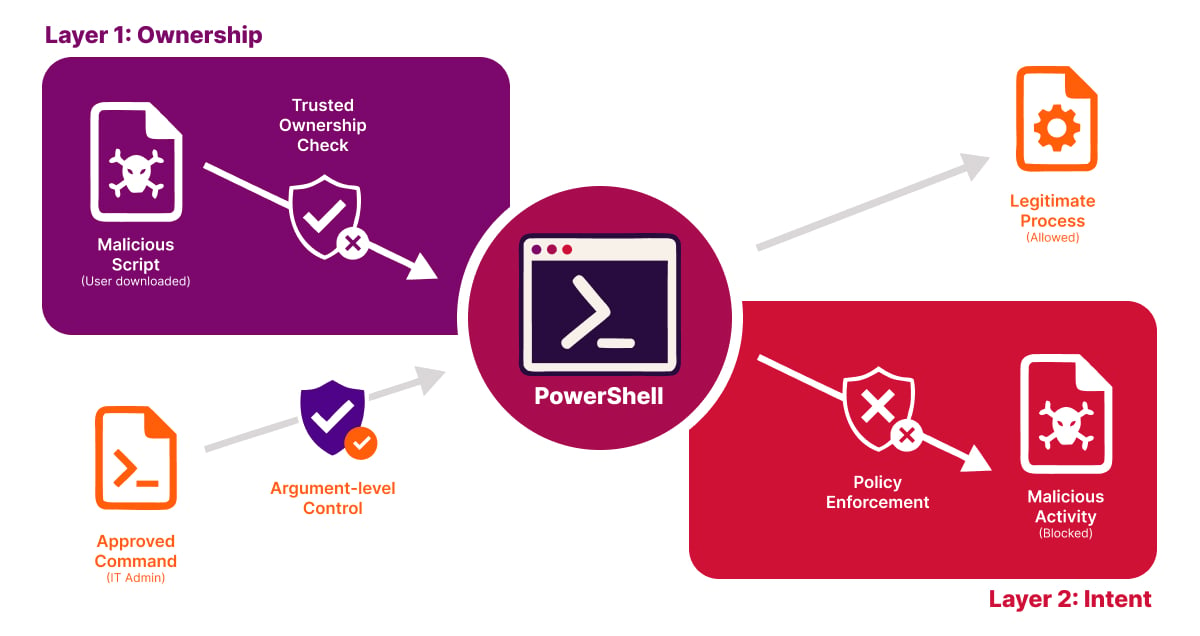
Ivanti handles this through a layered approach. A JAR file is first evaluated using Trusted Ownership, which blocks it immediately if it was introduced by a user rather than through a controlled deployment process. Beyond that, administrators can create simple allow rules that specify exactly which Java commands are permitted, ensuring that only legitimate Java based applications run while attempts to launch unapproved JAR files are quietly denied.
The same principle applies across other tools as well. Policies can approve the exact behavior your organization needs while blocking activities that fall outside those boundaries. This avoids broad, brittle rules and keeps daily work running smoothly.
The result is a balanced and modern approach. Trusted Ownership stops untrusted content by default. Focused hardening aligns with government and community best practices for reducing living off the land abuse and intent aware controls ensure that legitimate processes continue to function without opening doors for attackers.
This approach closely aligns with current community and government guidance on mitigating living off the land techniques. Agencies such as CISA, NSA, FBI and the Australian Cyber Security Centre emphasize reducing opportunities for attackers to use built-in tools by controlling how they are used and restricting the untrusted content they act upon. Their joint guidance highlights that LOTL attacks depend on abusing native tools and stresses the need for controls that limit this misuse without blocking legitimate system processes.
Ivanti’s model reflects this guidance. Trusted Ownership automatically blocks the untrusted content that attackers rely on, while a small number of focused restrictions address the small set of tools that require extra care.
Trusted Ownership in action: Real-world scenarios
Here are a few operational examples of how Ivanti Application Control and Trusted Ownership work in practice.
- A portable application is copied into the user profile. Ivanti blocks it because it is user-owned. AppLocker only blocks if there are matching rules. Without the right path or publisher rules, the behavior can differ.
- An email attachment launches a PowerShell script from Downloads. Ivanti denies it because of user ownership. AppLocker depends on script rules and, on block events, forces PowerShell into Constrained Language Mode, which will still run the script.
- Abuse of OS tools such as rundll32 or mshta. Both models need targeted deny hardening. Ivanti combines this with provenance control which generally reduces the number of exceptions you need. AppLocker relies on curated deny sets and requires periodic tuning.
- A vendor update ships new signed files. Ivanti allows the update when it arrives via the trusted deployment channel due to Trusted Ownership. AppLocker can accommodate this with publisher rules, but signature reuse across multiple products or unusual install paths often leads to extra maintenance and broader trust than intended.
- A user downloads a JAR and tries to run it with Java. Ivanti blocks the attempt because the JAR is user-introduced and fails Trusted Ownership. If needed, admins can allow only the exact approved invocation by matching the full command line. AppLocker cannot match arguments and relies on publisher, path or hash rules.
Conclusion
Provenance control shifts application control from a management problem to a trust model. Instead of trusting individual files, it trusts the process by which software arrives on a system, making security both scalable and workable.
Trusted Ownership fits squarely into this approach. It is neither a blocklist nor a classic allowlist, but a model where software that arrives through a controlled IT process is allowed by default, while everything outside that process is denied by default. By enforcing on origin and ownership rather than on ad hoc files, Ivanti Application Control and Ivanti Neurons for App Control align far better with modern attack techniques and today’s software distribution.
If you keep treating application control as a list management exercise, you will feel the administrative burden. If you treat it as a trust boundary, you gain scalability, security, and operational workability.
FAQs
What is Ivanti Application Control?
Ivanti Application Control combines dynamic allowed and denied lists with privilege management to prevent unauthorized code execution without making IT manage extensive lists manually and without constraining users.
What is provenance control?
Provenance control is a security approach that evaluates how a file arrived on a system by examining the origin and process that introduced it, rather than trusting files based solely on publisher, path or hash. This method shifts application control from object trust to process trust, creating a stronger security boundary.
What is application allowlisting?
Application allowlisting is a classic security method that controls which applications can run based on exact publisher, path or hash definitions. Unlike provenance-based approaches, traditional allowlisting does not evaluate installation origin and does not automatically trust enterprise deployment mechanisms.
What is Trusted Ownership?
Trusted Ownership is Ivanti Application Control's implementation of provenance control, where any file placed by a trusted owner (such as SYSTEM, TrustedInstaller, or Administrators) is automatically allowed, while anything introduced by a user is denied by default. This trust model applies consistently across all file types including executables, DLLs, installers and scripts, enabling software delivered through standard enterprise deployment channels to run immediately without rule maintenance.