Key Takeaways
- DLL hijacking (also known as a DLL preloading attack) is a security vulnerability in which a legitimate and trusted Dynamic Link Library (DLL) file in a Windows application is replaced with a malicious one.
- DLL hijacking introduces multiple security risks (e.g., data theft, compromised systems, malware).
- To prevent hijackings, developers and users should ensure that applications load DLLs from trusted directories, use full paths, implement file integrity checks, and deploy security software. Regular updates and patch management are also crucial.
There’s been buzz around CVE-2025-56383 (published on Sept. 26, 2025), a hijacking vulnerability in Notepad++ v8.8.3 in which a DLL file can be swapped to execute malicious code.
The CVE has been disputed by multiple parties, but we’re not here to comment on that. However, we are here to comment on DLL hijacking and discuss the very real threat that it poses to an organization. Let’s look into what DLL hijacking is and what measures you can take to keep your DLLs safe.
What DLL hijacking is and how it happens
DLL hijacking (also known as a DLL preloading attack) is a security vulnerability where a legitimate and trusted Dynamic Link Library (DLL) file in a Windows application is replaced with a malicious one.
This method exploits the way applications load DLL files, which contain code and data used by multiple programs. By loading a malicious DLL, a threat actor can execute their own code with the same privileges as the legitimate application, leading to privilege escalation, persistence and defense evasion.
When a program starts, it often needs to load various DLLs to perform specific functions, typically from trusted system directories. However, if an application is not careful about where it looks for these DLLs, it might load a malicious DLL from an insecure or predictable location (i.e., the current working directory or a network share). This can happen if the application does not specify the full path to the DLL or if it searches for the DLL in a directory that can be accessed or modified by an attacker.
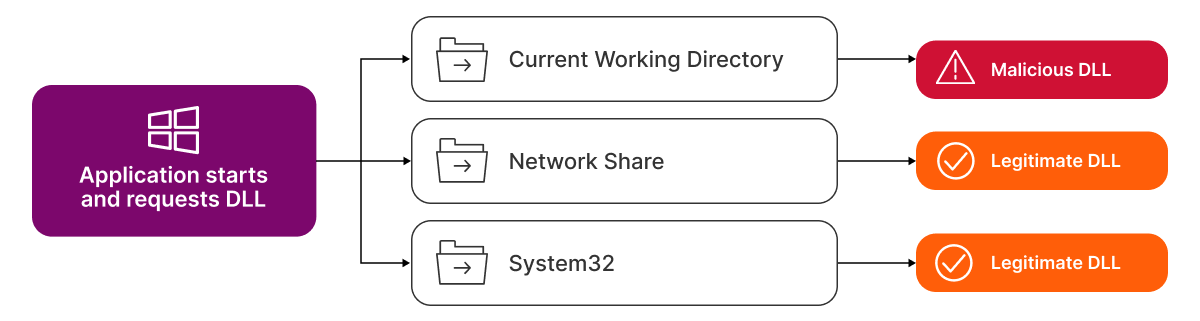
While this type of attack is not new, it remains effective due to its simplicity. And although this specific issue pertains to Windows applications, it's important to call out that similar vulnerabilities can affect other operating systems (like Linux and macOS, which use dynamic loading for shared libraries).
DLL hijacking introduces multiple security risks, including:
- Data theft: The malicious DLL can intercept and steal sensitive data, such as passwords or personal information.
- Compromised systems: The attacker can gain control over the system, potentially leading to further attacks or the installation of additional malware.
- Malware: The malicious DLL can act as a conduit for spreading malware, infecting other parts of the system or network.
A DLL can be hijacked in several different ways; here are some of the most common techniques:
- Insecure DLL search order: Attackers place malicious DLLs in directories searched before the legitimate DLL's location.
- Relative path manipulation: Malicious DLLs are loaded when applications use relative paths.
- DLL redirection: Techniques like path manipulation redirect the DLL loading process.
- Weak permissions: Attackers replace legitimate DLLs with malicious ones in directories with weak permissions.
- Phantom DLL hijacking: Attackers exploit applications loading non-existent DLLs by placing malicious DLLs with the same name in searched directories.
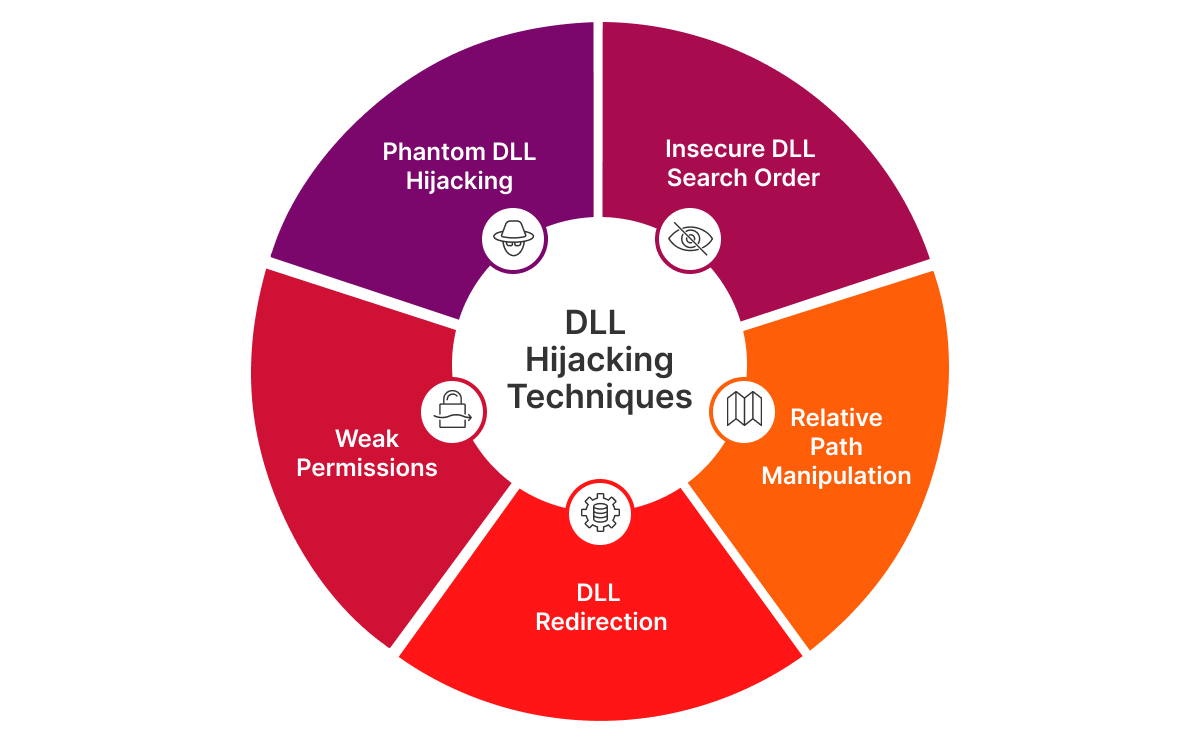 These potential vulnerabilities highlight the importance of secure coding practices and directory permission management when it comes to preventing this form of attack.
How to prevent DLL hijacking and keep your DLLs safe and secure
Although DLL hijacking remains a threat, there are best practices you can follow and implement to reduce your risk for a safer, more secure IT environment.
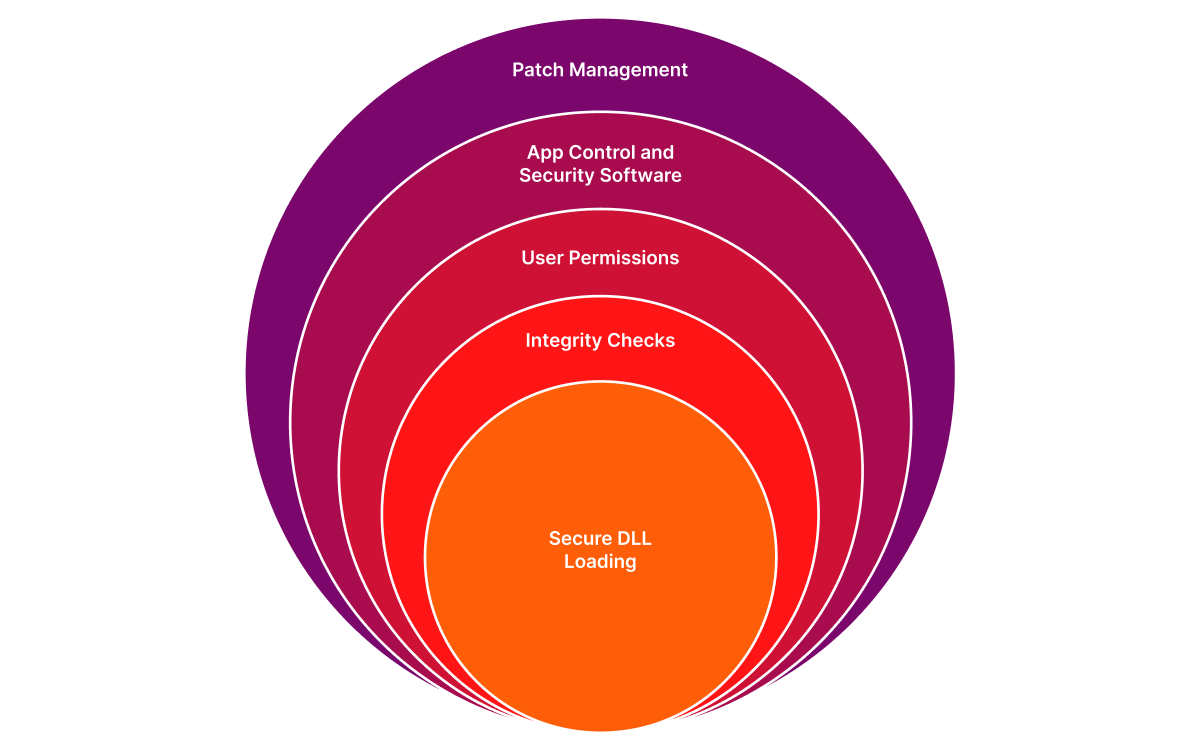
Secure DLL loading:
- Use full paths: Always specify the full path to the DLL when loading it. This ensures that the application loads the DLL from a trusted location (and not from an insecure directory).
- Set the safe search path: Use the SetDllDirectory function in Windows to add trusted directories to the search path and exclude insecure ones. This can help prevent the application from loading DLLs from unexpected locations.
File integrity checks:
- Digital signatures: Ensure that DLLs are signed with a digital signature and verify the signature before loading the DLL. This can help confirm that the DLL has not been tampered with.
- Hash verification: Use cryptographic hash functions to verify the integrity of DLL files. If the hash of the DLL does not match the expected value, the file may have been modified.
User permissions:
- Least privilege principle: Run applications with the least privilege necessary. This limits the potential damage of a DLL hijacking, as the malicious code will have fewer permissions to execute harmful actions.
- User Account Control (UAC): Enable UAC on Windows systems to prompt users for permission before running applications with elevated privileges. This can help prevent unauthorized changes to system files.
Application control and privilege management:
- Known and trusted applications: Application control ensures that only known and trusted applications are launchable, removing the risk of unauthorized applications being introduced.
- Privilege control: Effective privilege management is crucial in preventing DLL hijacking. By ensuring that applications have the correct rights and privileges to launch, you limit the ability of unauthorized users to introduce malicious files. This control acts as a key barrier, restricting the access an attacker needs to exploit the DLL search mechanism and thereby enhancing the security of your environment.
Security software:
- Antivirus and anti-Malware: Use reputable antivirus and anti-malware software to detect and prevent the loading of malicious DLLs. These tools can scan for known malicious files and behaviors.
- Intrusion Detection Systems (IDS): Implement IDS to monitor for unusual activity, such as unexpected changes to DLL files or attempts to load DLLs from insecure locations.
Patch management:
- Keep software updated: Regularly update applications and operating systems with the latest security patches. Many DLL hijacking vulnerabilities are fixed via updates, so stay current to help protect against known threats.
- Automated patching: Use an automated patch management tool to ensure that all systems are kept up to date without manual intervention. This reduces the window of opportunity for attackers to exploit known vulnerabilities, including those that could be used for DLL hijacking. This proactive approach helps maintain the integrity of your applications and operating systems, making it much harder for attackers to inject malicious DLLs.
By implementing these best practices, you can significantly reduce the risk of DLL hijacking and enhance the overall security of your applications and systems.
Combine the right tools and tactics to prevent DLL hijackings
DLL hijacking has been a persistent form of attack for years, proving that it’s still effective and will therefore continue to be an issue for organizations.
Future-proof your organization using the best practices mentioned above combined with proven solutions like Ivanti Neurons for App Control to help keep your DLLs secure. Capabilities like Trusted Ownership catch and deny a hijacked DLL from being executed by ensuring that ownership of the items matches your approved list of trusted owners.
And, keep your apps up to date to limit exposure to known vulnerabilities. Remove the risk of human error by automating patching with Ivanti Neurons for Patch Management, ensuring that systems are automatically updated and secured.
FAQs
What is DLL hijacking and why is it dangerous?
DLL hijacking is a vulnerability where attackers replace a legitimate Dynamic Link Library (DLL) with a malicious one. This allows them to execute harmful code with the same privileges as the application, leading to risks like data theft, malware infection and full system compromise.
How does DLL hijacking happen?
It occurs when applications load DLLs from insecure locations. Common techniques include:
- Insecure DLL search order (loading from directories before trusted ones).
- Relative path manipulation.
- DLL redirection via PATH changes.
- Exploiting weak directory permissions.
- Phantom DLL hijacking (placing malicious DLLs where non-existent ones are expected).
How can automated patch management help reduce DLL hijacking risks?
Automated patching ensures systems receive security updates promptly, closing known vulnerabilities before attackers exploit them. It reduces human error and keeps applications and operating systems consistently secure.
What tools can help protect against DLL hijacking?
Solutions like Ivanti Neurons for App Control enforce trusted ownership, blocking unauthorized DLLs, while Ivanti Neurons for Patch Management automates updates to minimize exposure to vulnerabilities.