Smiling woman interacting with a laptop.
Use Case

Make Your Microsoft E3/E5 License Go Further

You don’t have to settle for the limitations of Microsoft Intune. Ivanti Endpoint Management and Security solutions are purpose-built to complement what you already get with Intune — so you can address gaps, add advanced functionality and unlock real efficiency — without the hefty costs of upgrading to the full Microsoft Intune Suite.

Better outcomes. Better experiences.

Scale your organization and take your IT operations to the next level with comprehensive discovery as well as robust endpoint and experience management capabilities.
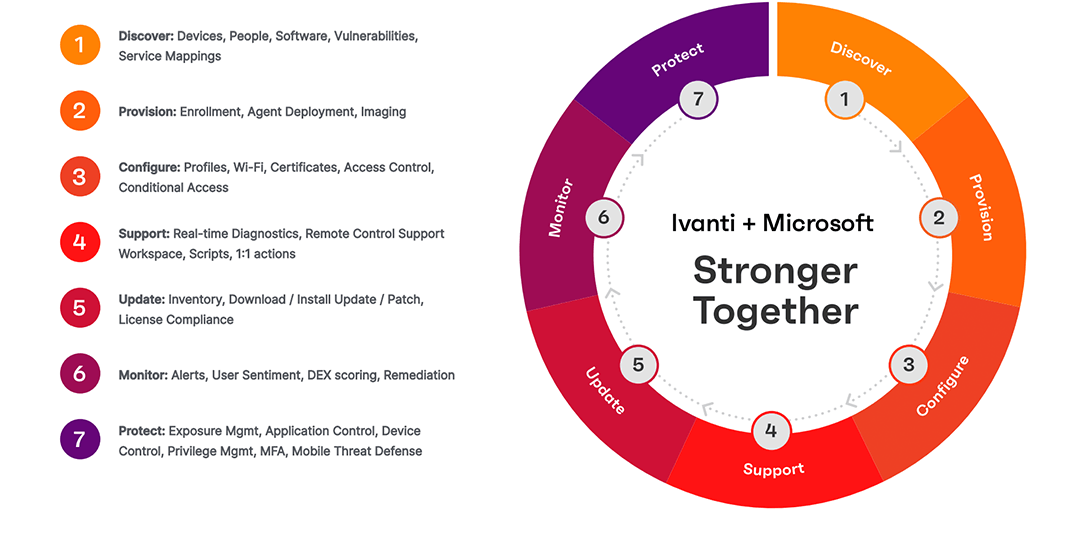

Ivanti and Microsoft partnership diagram

Enhanced visibility

Ivanti actively and passively discovers unmanaged devices, IoT and rogue endpoints, enhancing Intune device inventory to provide full visibility.

Man and woman looking towards a computer monitor.

Remote support

Proactively resolve device and security issues, as well as any associated productivity degradation, to ensure a smooth and efficient IT environment. By taking a proactive approach, you can prevent problems before they impact your users, maintain enterprise-level security and keep your team focused on their core tasks.

Two women interacting with a laptop and a tablet computer.

Third-party app patch management

Reduce threat exposure with risk-based patch intelligence and automated third-party patch publishing — without the need for additional infrastructure.

Woman interacting with a tablet computer.

Application control and privilege management

By centralizing privilege and application control, your IT team can more effectively monitor and manage your IT ecosystem, minimizing security risks and ensuring that only authorized applications are installed.

Man and woman discussing something while the woman gestures towards a tablet computer held in her hand.

Windows 11 migration

Ivanti can assist your organization in scoping, planning and executing Windows 11 migrations. With Ivanti, customers can discover all devices needing upgrades, automate and execute the upgrades, troubleshoot and even manually upgrade devices remotely. Ivanti also offers extended support options to keep devices secure until migration.

Man working on a windows laptop.

FAQs

1. What Microsoft solutions does Ivanti integrate with?

There are several Microsoft solutions that Ivanti can integrate with.  For example, Microsoft Intune, Microsoft Entra ID, Microsoft Defender for Endpoint etc.

2. How does Ivanti enhance Microsoft Intune?

Ivanti's solution lets you keep your existing UEM solution from Microsoft — no need to ‘rip and replace’. It runs in parallel with Microsoft Intune and brings additional endpoint management and digital experience (DEX) capabilities for remote help and automation. 

  • Advanced discovery and inventory of all cyber assets — hardware, software and servers.
  • Real-time insights and analytics for infrastructure and endpoints.
  • Advanced troubleshooting without impacting end users.
  • AI-driven self-healing automation improves cyber hygiene and digital experience.
  • Seamless enterprise and complex application deployment.
  • DEX scores based on survey and sentiment analysis.
  • Comprehensive dashboards with critical device KPIs and reports.

3. Can Ivanti help with Windows 11 migration?

Yes, we can! Please see our latest blog post to learn more about how Ivanti can help with Windows 11 migration.

4. What are the benefits of using Ivanti with Microsoft solutions?

Ivanti solutions integrate seamlessly with a variety of Microsoft endpoint management and security products, ensuring a smooth and efficient workflow. This integration allows you to leverage the full capabilities of both Ivanti and Microsoft tools, enhancing your overall IT and security operations. 

Here’s how Ivanti can benefit your organization: 

  • Significant cost savings — Ivanti provides a single license that includes a wide range of advanced features and capabilities, such as remote management , advanced analytics and automation.
  • Improved IT efficiency — Centralized management and automation features reduce the time and effort required to manage and support endpoints, allowing your IT team to focus on more strategic tasks.
  • Enhanced user satisfaction — Employees can access the tools they need and receive timely support, which boosts their productivity and overall satisfaction.
  • Strengthened security — Advanced security features help protect your endpoints from threats, ensuring that your remote workforce remains secure. 

In addition to these direct cost savings, Ivanti can lead to further savings through improved IT efficiency and user productivity. This makes Ivanti a highly cost-effective and valuable addition to your IT infrastructure.

5. Does Ivanti support third-party patching for Microsoft environments?

Ivanti works in tandem with Microsoft to create a ‘better together’ strategy, addressing the limitations of Microsoft’s native security capabilities when it comes to third-party applications and patch management. By bridging these gaps, Ivanti enables organizations to achieve enhanced security and control across endpoints, all while maximizing the value of their existing technology stack.

6. How do I get started with integrating Ivanti and Microsoft?

Select the appropriate Ivanti and Microsoft products that align with your needs. For example, Ivanti Neurons for Digital Employee Experience can integrate with Microsoft Intune for cloud-based endpoint and experience management.

We’re happy to help you choose the right solutions for your organization. Consult with Ivanti and Microsoft experts to create a detailed integration plan, ensuring a smooth and successful implementation.

Ready to learn more about Microsoft and Ivanti?

Book a demo, ask about our solutions or just say hello.