Key Takeaways
- Upgrading to Windows 11 before Windows 10 support ends in October 2025 is essential because the new OS adds stronger encryption, improved threat detection, and a modern interface that boosts productivity and security.
- Hardware incompatibility, unknown devices, and user resistance are major challenges, so Ivanti’s Neurons platform performed inventory, eligibility checks, and used Teams bot notifications to schedule upgrades and reduce disruption.
- Ivanti automated the migration workflow with pre‑check, upgrade execution, monitoring and ticket creation, and provided Extended Security Updates for non‑eligible machines to extend device lifecycle and ease compliance.
Windows 11 offers enhanced security and a modern user interface, but the transition can be complex for large organizations, with logistical and employee buy-in challenges. Microsoft will end support for Windows 10 on October 14, 2025, so it's crucial to start planning and executing Windows 11 deployments now.
The need to migrate to Windows 11
Migrating to Windows 11 is essential for staying current, secure and efficient. It provides advanced security features like stronger encryption and improved threat detection, safeguarding your data and enhancing IT resilience. The user-friendly interface also streamlines daily tasks, boosting productivity. With Microsoft ending support for Windows 10 this year, upgrading can help organizations avoid increased security risks and potential downtime. According to Gartner, many enterprises are opting to replace even compatible machines with new hardware to ensure optimal performance with Windows 11. Proactive planning ensures a smooth and seamless transition.
Ivanti’s use-case for Windows 10 to Windows 11 migration
At Ivanti, we’ve been successfully rolling out Windows 11 migrations since the beginning of 2025. Like many large organizations, this migration is something we’ve been discussing and planning for quite some time. The goal is to update every eligible machine in a timely manner and triage ineligible machines for further troubleshooting or replacement.
To meet this goal, we prioritized using our own Ivanti Neurons platform solutions, which equipped us with the proactive tools and insights necessary for a successful Windows 11 deployment. Using a phased approach, we were able to identify and address issues coming back from early adopters and gather valuable feedback. Once we saw validation of our plan, we could gradually roll out the upgrade to the rest of the organization, ensuring a smoother migration overall.
Potential challenges
Like any other company, we wanted to get ahead of any potential barriers to a successful migration.
Hardware compatibility and unknown devices
One of the biggest challenges in upgrading to Windows 11 is meeting the hardware requirements. Many existing devices may not satisfy Microsoft's strict criteria, limiting the number of eligible machines. This can be especially problematic for organizations with a mix of older hardware. To tackle this, Ivanti’s IT team used our discovery capabilities to perform a thorough inventory and assessment of all devices, identifying those that would need to be upgraded or replaced before starting the migration. You can’t migrate devices you don’t know about, which made a comprehensive view of our IT landscape a key first step.
End-user friction and disruptions to productivity
User resistance to new interfaces and features can be another barrier to success. Change can be daunting, and the new look and features of Windows 11 may intimidate users accustomed to older versions. OS upgrades can also cause disruptions to users’ work, causing frustrations and downtime. To minimize these issues, Ivanti’s IT team wanted to make sure that updates were happening at a time most convenient to the end user to avoid losing unsaved work or disrupting productivity in general.
Continuing security updates with extended support
Not every machine can immediately upgrade to Windows 11 due to hardware requirements. However, Ivanti’s extended support will allow us to continue Windows 10 security updates past October, keeping these devices protected and functional.
Ivanti’s Extended Security Update (ESU) deployment streamlines the patching process, reduces IT workload and maintains compliance with regulations like GDPR, HIPAA, or PCI-DSS. Unpatched systems face over 1,200 vulnerabilities annually, and a data breach can cost an average of $4.45 million, according to IBM. We need to make sure that any devices that don’t update to Windows 11 are kept safe and secure from vulnerabilities.
Extended support also helps us extend our device lifecycle for devices that aren’t quite ready to be replaced, or when budget constraints are a factor. According to Gartner, many enterprises are still delaying purchases despite the need to move from Windows 10 to Windows 11, extending the lifecycle of their existing equipment and seeking alternatives to maximize their budgets. Ivanti’s ESU solutions help extend the lifespan of these devices, avoiding the high costs of a full hardware refresh. This ensures seamless patching, minimizes security risks and reduces manual IT effort, helping us avoid potential losses and disruptions.
Ivanti’s Windows 11 migration workflow
Ivanti Neurons allowed us to automate key elements of the migration, from the initial device assessment to the upgrade itself, streamlining each phase and allowing our IT team to concentrate on other mission-critical activities. In general, here is how the workflow for updating devices from Windows 10 to Windows 11 looks at Ivanti.
1. Preparation
- Identify Devices: Create a group of Windows 10 devices that need to be upgraded.
- Download Files: Push necessary files to the devices, ensuring efficient data transfer by using ZIP files.
2. Pre-Check
- Eligibility Check: Run PowerShell scripts to verify if the device meets the hardware requirements for Windows 11.
- Power Check: Ensure the device is connected to A/C power.
3. User Interaction
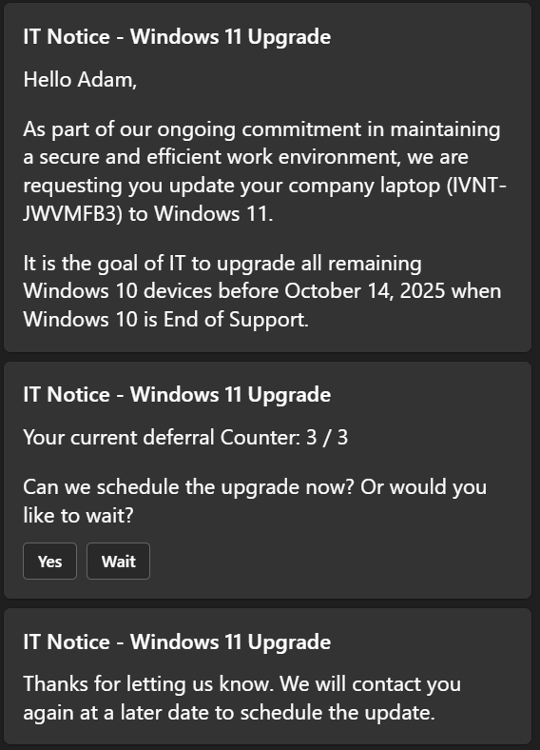
- Notification: Use Teams bot integration to notify users about the upgrade and allow them to schedule it.
- Consent: Users provide consent for the upgrade via an interactive Teams message.
4. Upgrade Execution
- Run Upgrade: Execute the Windows Update Assistant to perform the upgrade.
- Monitor Progress: Track the upgrade process and handle any errors or issues that arise.
5. Post-Upgrade Actions
- Restart Device: Prompt users to restart their devices to complete the upgrade.
- Activation Check: Verify that the device is activated with an enterprise license key.
- Additional Updates: Apply any necessary Windows updates post-upgrade.
6. Error Handling
- Automated Ticket Creation: Use a bot to generate tickets for devices that fail the upgrade process.
- Troubleshooting: Enterprise services team handles cases where devices cannot be upgraded automatically.
7. Continuous Improvement
- Refinement: Break down the upgrade process into smaller automated steps to streamline operations.
- Feedback: Incorporate user feedback to improve the upgrade experience.
This workflow ensures a smooth transition from Windows 10 to Windows 11 while minimizing disruptions and handling exceptions efficiently. This process has been rolled out gradually, taking it one week at a time. It’s been thoughtful and intentional, working to build this process and workflow for the future by ensuring it’s flexible and modular. That way, we can revisit a similar process for the next generation of Windows whenever it comes.
Ready to start your Windows 11 migration?
Migrating to Windows 11 is essential for maintaining security, efficiency and compliance. Ivanti has leveraged our own solutions to automate key steps, gather user feedback and provide extended security updates for ineligible devices, all while ensuring a smooth transition that minimizes end-user disruption and maximizes IT efficiency.
Ivanti’s approach and workflow not only addresses current challenges but also sets up a flexible and modular foundation for future OS upgrades.
Ready to start your own Windows 11 migration? Learn how Ivanti Neurons can simplify and automate the process.
FAQ
When does Windows 10 support end?
Windows 10 support ends on October 14, 2025. After this date, Microsoft will no longer provide free security updates, feature updates or technical support for Windows 10.
What are the key challenges in migrating to Windows 11?
The biggest challenges in migrating to Windows 11 are identifying all devices that meet the hardware requirements, reducing end-user friction and meeting security requirements with extended support.
How does Ivanti support devices not eligible for Windows 11?
For devices unable to be upgraded to Windows 11, Ivanti offers extended support to continue Windows 10 security updates past October, keeping these devices protected and functional.
What is Ivanti Neurons’ role in Windows 11 migration?
Ivanti offers a smooth, efficient and hassle-free migration, from initial discovery and planning to execution and ongoing support, empowering your organization to stay productive and secure throughout the process. Learn more about the different ways Ivanti can facilitate your Windows 11 migration.
Can Ivanti help automate large-scale OS upgrades?
Ivanti’s powerful discovery and automation capabilities make large-scale OS deployments feasible by breaking down the process and leveraging automation to make it as painless as possible for everyone involved.