Last month we released a new integration for our Ivanti Service Manager (ISM) with the online platform, Zapier. For those of you who don’t know, Zapier is an online automation platform that can integrate over 1000 different cloud applications. By adding our ISM platform to Zapier we’ve opened the door to thousands of different use cases you can take advantage of.
Below is a small snapshot of the applications available for ISM to integrate with:

I thought I’d get my hands dirty to test this out and see what use cases I could come up with. So far, I’ve created Twitter and Slack Zaps, but in this blog, I’m going to focus on my LiveChat Zap.
A lot of customers I speak to would like a way to better manage the interactions from their online help application. I’m sure you’ve come across LiveChat before, or something very similar to it when you visit a website. It ‘dings’ and a floating image of a person in the bottom right hand side of the page asks if you need any help. (Ivanti uses a ChatBot named Ivy. Read more about her here.) So the use case I created with LiveChat was to create an Incident ticket in ISM when the analyst can’t solve a customer’s issue via LiveChat. Below is an example:

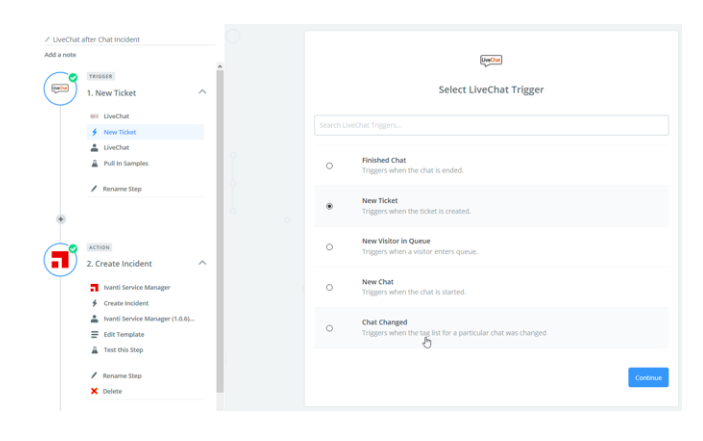
For LiveChat there are several different triggers. I went with ‘New Ticket’ so I can control when the incidents are created.
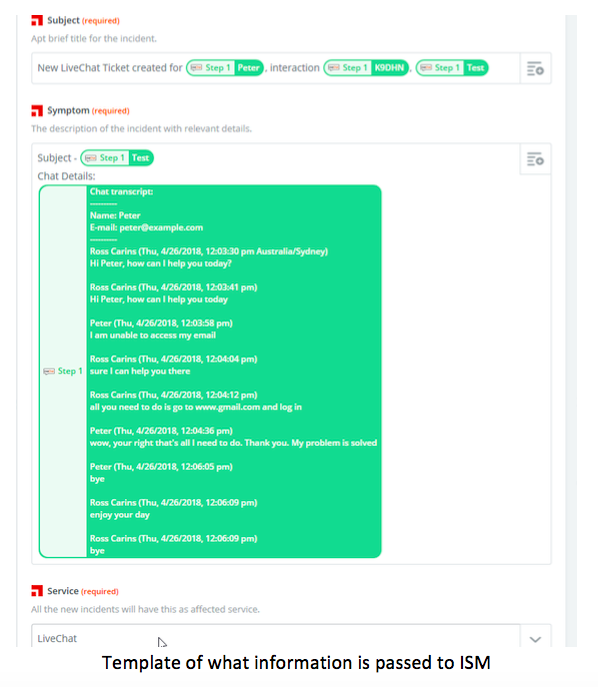
Once you’ve specified the connection to ISM, you can then create the template,using the attributes available from LiveChat to pre-populate the summary, description and a few other fields when the incident is created.
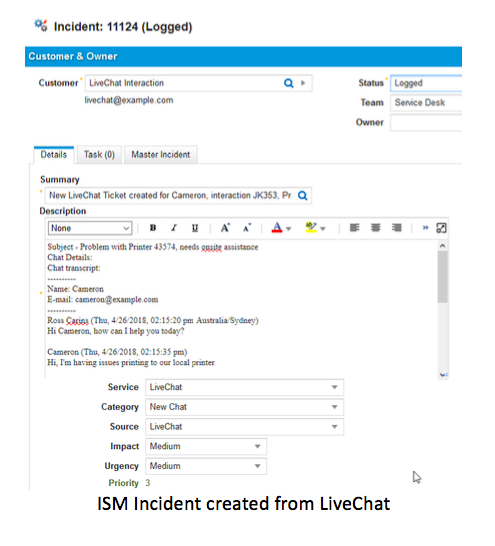
And that’s all there is to it! The result is an incident created in ISM with all the information you specified in the template. You can treat the incident as you would normally or create specific workflows and quick actions for this type of incident.
As I mentioned, this is just one of thousands of possible uses cases and I plan to explore more of these myself in the coming months. In the meantime, I’ve also created a video of how this integration works in practice. Let me know if there’s any use case you’d like me to investigate.