Take control of your applications
As application environments become more complex, more distributed, and more virtualized, enterprises need a broader set of tools to solve performance problems for their web-based services.
Ivanti Virtual Traffic Manager is a software-based application delivery controller (ADC) designed to deliver a faster, high-performance user experience, with more reliable access to public websites and enterprise applications, whether they run in a public cloud, private cloud or virtualized environment, while maximizing the efficiency and capacity of web and application servers.
As a foundational element of the Ivanti Virtual Application Delivery Controller (vADC) solution, Virtual Traffic Manager works seamlessly with:
- Ivanti Services Director - the centralized control plane for orchestrating large-scale deployments of Ivanti Virtual Traffic Manager instances. With built-in support for automation, multi-tenancy and usage-based licensing, Services Director enables organizations to scale application delivery infrastructure dynamically, without adding operational complexity.
- Ivanti Web Application Firewall (WAF) – for integrated application-layer security and threat protection.
Together, these components provide a unified solution for modern application delivery, orchestration and protection. This powerful combination helps organizations accelerate digital transformation, reduce operational complexity, and ensure consistent performance across the enterprise.
|
Component |
Primary Function |
Key Capabilities |
|---|---|---|
|
Virtual Traffic Manager |
Application delivery and traffic optimization |
Layer 7 load balancing, SSL offload, caching, compression, TrafficScript customization |
|
Services Director |
Centralized orchestration and license management |
Optimized provisioning, multi-tenancy, REST API automation, visibility, and reporting |
|
Web Application Firewall |
Application-layer (L7) security |
OWASP threat protection, bot mitigation, PCI-DSS compliance, anomaly detection |
Deliver fast, secure, and available applications
Web traffic is rarely constant: it has peaks and valleys that can make it difficult to plan for future business growth. The Ivanti Virtual Traffic Manager is a unique, high-performance software solution that’s mobile, flexible and scalable. It allows cost-effective scale capacity and the ability to move between hardware and deployment platforms as required. It also reduces the strain placed on application infrastructure with network-level buffering, protocol optimizations and application-specific measures such as dynamic compression and caching. The result is reduced latency, increased capacity, improved availability, and optimized service levels for each end user.
Accelerate, optimize, and secure your applications
- Accelerate and enhance applications, leading to improved customer satisfaction and higher productivity.
- Reduce costs with flexible capacity management, and scale applications up or down to meet changing traffic demands.
- Take advantage of cost benefits of using cloud technologies, while retaining the performance and security.
- Protect applications against external threats and network attacks and resolve application problems and vulnerabilities.
- Roll out new applications and services up to 10x faster than traditional ADC solutions.
How Ivanti Virtual Traffic Manager works
The Ivanti Virtual Traffic Manager inspects and processes application traffic with full payload inspection and streaming. As requests are received, a range of optimization techniques ensures that requests are presented in the most appropriate manner to the web and application servers. Responses from the application can be compressed, cached, and returned to the client at optimum speed, while freeing up resources on the server. Built-in TrafficScript software controls how individual requests are optimized, routed, and transformed. Traffic management rules may also be created using Java extensions.
The Ivanti Virtual Traffic Manager includes a web-based administration interface that provides powerful real-time and analysis and history for traffic across Ivanti Virtual Traffic Manager clusters. Alternatively, REST, SOAP and SNMP interfaces can be used to integrate the solution into remote management and event monitoring frameworks for automation of ADC deployment, configuration and integration with customer self-service portals.
Reliable support options
Ivanti Essential Support
- Provides 24×7 access to Ivanti Technical Support expertise, reducing time to resolution.
- Provides unmatched expertise in data center networking to optimize network performance.
- Simplifies management through online technical support tools.
Bring new services to market faster
ADCs are an important part of the modern application platform. They provide key functionality such as security, centralized authentication, rate shaping and queuing, and content modification to support applications. They also support operations such as the gradual introduction of new servers, session upgrades between application generations, and A/B testing. Their monitoring and debugging capabilities also help deliver reliable applications with predictable performance.
The Ivanti Virtual Traffic Manager includes TrafficScript scripting software, which provides fine-grained control over how traffic is managed. TrafficScript is designed with application developers in mind, making it far more efficient and easier to use than traditional network or event-based solutions. The Ivanti Virtual Traffic Manager also provides graphical analysis and management tools to give control over the complete ADC infrastructure.
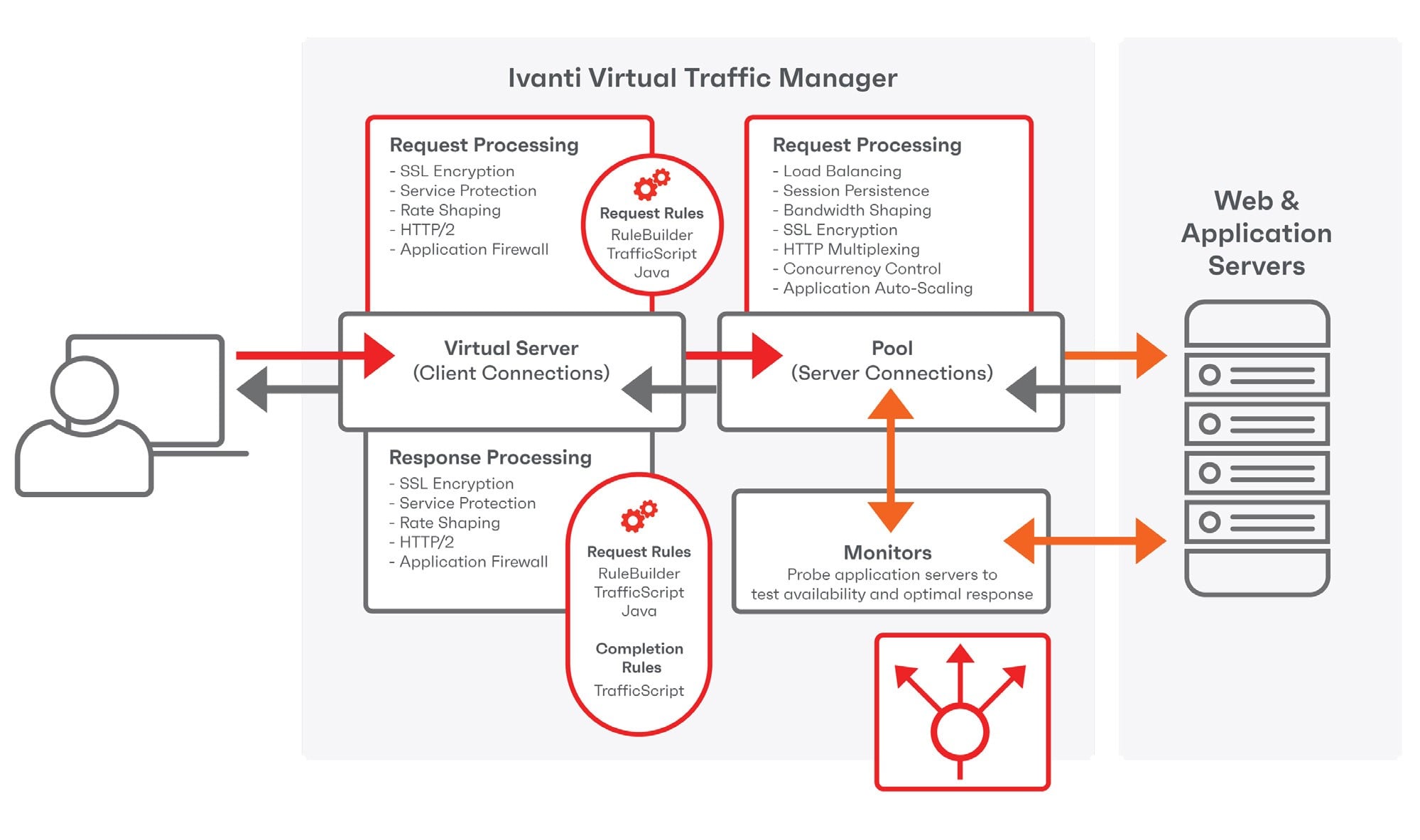 Figure 1. The advanced capabilities in the Ivanti Virtual Traffic Manager can be enhanced using TrafficScript or Java extensions
Feature summary
Ivanti vADC is available in two key feature tiers, the Advanced Edition and Enterprise Edition.
Advanced Edition:
Includes the most common load balancing capabilities, including SSL/TLS offload, session persistence, service level monitoring, simple TrafficScript Rule Builder, and support for IPv6 and HTTP/2; and includes capabilities such as Global Load Balancing, Route Health Injection, and customization using Ivanti’s powerful TrafficScript scripting language and Java extensions.
Enterprise Edition:
Adds premium Layer 7 services such as Web Content Optimization (WCO), Web Application Firewall (WAF), Enhanced UDP Traffic Management, and FIPS compliance.
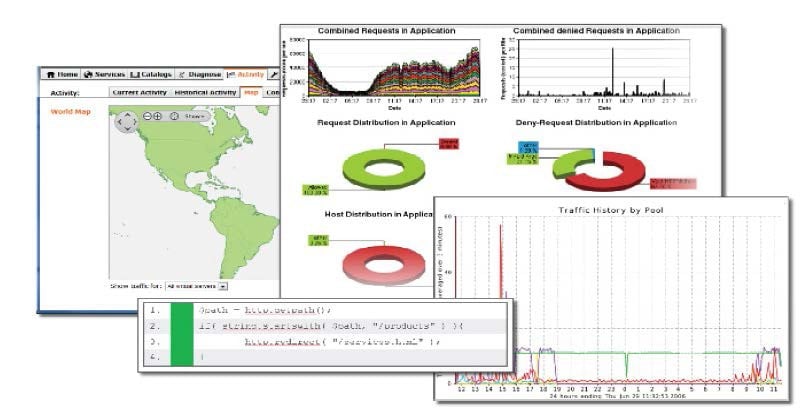
Figure 2. Powerful application management and visibility tools give users full control over the ADC environment.
Advanced Edition features
Load balancing
The Ivanti Virtual Traffic Manager can use a wide variety of algorithms and techniques and balance load based on different criteria (e.g., can send more requests to higher spec machines). Servers can be trained for easy maintenance and uninterrupted service. The client never has to see a server fail.
HTTP/2 support
Faster web pages with support for HTTP/2 connections. HTTP/2 is a significant enhancement to the HTTP/1.1 standard: Traffic Manager can automatically negotiate an HTTP/2 connection with the client web browser, which may improve web page load time with techniques such as connection sharing, page request multiplexing and header compression. For even more advanced HTML and web content optimization, the optional Ivanti Web Accelerator add-on module is available to create custom optimization profiles for individual applications.
Content routing
Use the Ivanti Virtual Traffic Manager to apply business policies to each request for custom routing decisions, applying HTTP pool selection routing based on L7 attributes such as URL and hostname. Content inspection allows rapid web changes such as the insertion of marketing tags, branding changes, and dynamic watermarking, procedures that may be difficult to achieve by modifying the application itself.
Session persistence
Ensures all requests from a client go to the same server, enabling application data to persist throughout a session without using cookies (e.g., an e-commerce shopping basket).
Health monitoring
Monitor the health and correct operation of servers with built-in and custom checks. Detect failures of servers and errors in applications, and route traffic away from these servers so that the performance of the application is not compromised, and the user experience is maintained.
Simple TrafficScript RuleBuilder
Define rules to control applications with the TrafficScript Rule Builder, using an easy-to-use graphical user interface to create traffic rules and policies. Click and choose from drop-down menus to create simple conditions and actions.
SSL/TLS offload
Off-loading SSL/TLS key exchanges and decryption to the Traffic Manager frees up the back-end servers to use their full resources for generating content and responding to user requests. Decryption on the Ivanti Virtual Traffic Manager allows for deep packet inspection. Content can be re-encrypted for secure forwarding of requests to the back-end infrastructure.
HTTP compression
The Ivanti Virtual Traffic Manager can compress content returned to the client rather than have that workload undertaken by the back-end servers. Compression of content can result in bandwidth being used more efficiently. Offloading this workload from the back-end servers can enable it to serve requests faster.
Event handling and action system
Configure appropriate responses for key infrastructure events, including email and SNMP alerts, syslog logging and custom user supplied scripts.
Service protection
The Ivanti Virtual Traffic Manager can enforce an IP allow/deny list and limit the number of connections to a service. It can also enforce rules on HTTP content (e.g., enforce RFC compliance) and help protect against malicious attacks such as Denial of Service.
Activity graphs
The Ivanti Virtual Traffic Manager measures performance and load and gives a graphical representation of the results, which can identify bottlenecks and identify where and when high loading occurs, which can be useful for identifying future upgrade needs.
HTTP caching
The Ivanti Virtual Traffic Manager can store copies of frequently requested data on the Traffic Manager rather than the back-end servers, freeing them up to deliver newly requested content. This can reduce the need for additional servers as traffic grows and speed up the response to end user requests.
Autoscaling
Ensure reliable application service delivery by automatically managing traffic changes in real time, distributing traffic among a pool of virtual servers. It can orchestrate the provisioning and rightsizing of applications, helping to migrate traffic across multiple virtual and cloud platforms.
Bandwidth management
You can limit the total bandwidth (kbits/ sec) a set of connections can use, which can be used to stop a popular site or application taking up so much bandwidth that other sites or applications become unavailable. This can enable service providers to enforce access limits based on criteria such as account type or location.
Rate shaping
The Ivanti Virtual Traffic Manager can restrict the number of requests (per min or sec) to a service, from either all or a set of clients. This can stop a small group of intensive users (including spiders) hogging a service, leading to a poor user experience for all users.
Service level monitoring
The Ivanti Virtual Traffic Manager monitors the performance of a service or application and can issue an alert if it falls below a pre-determined level, such as going out of scope of an SLA.
TrafficScript
TrafficScript is a sophisticated programming language integrated within the core of Traffic Manager that enables high performance and highly configurable control of traffic management policies. TrafficScript rules can control all aspects of how traffic is managed and can choose when and where to apply request rate shaping, bandwidth shaping, routing, compression, and caching to prioritize the most valuable users and deliver the best possible levels of service.
XML parsing
It can also help parse complex XML data using XPath in order to make informed routing decisions based on embedded content. Also includes supports for the offload and acceleration of the translation between XML variants via XSL Transformations (XSLT).
Java extensions
Java extensions can be used to re-use existing code libraries to implement business policies. You can write rules in any language that can target the JVM, including Java, Python, Ruby, and many others. You can use third party libraries and invoke business rules against specific transactions.
Multi-site capable
Deploy services across multiple sites with location specific configuration and simplify the management of services from multiple datacenter locations.
Advanced session persistence
Ensures all requests from a client go to the same server, enabling application data to persist throughout a session without using cookies (e.g., an e-commerce shopping basket). In addition to session persistence based on IP addressing, advanced persistence mechanisms can be leveraged via TrafficScript, including Named Node and Universal Persistence techniques.
Global load balancing
Improve service availability by automatically failing over to an alternative data center or cloud deployment in the event of a catastrophic failure. Improve service performance by performance sensitive load balancing and location-based traffic routing.
Kubernetes Ingress Controller
Specialized load balancer for applications deployed in Kubernetes environments. Reduces application traffic routing complexity for nodes inside Kubernetes cluster environments. Handles SSL authentication and termination for application traffic and reduces workloads for Kubernetes environments. Improved security posture for applications hosted in Kubernetes clusters.
Route health injection
Route health injection (RHI) helps to maintain service availability and low-latency networking by providing rapid service redirection to alternate service hosts.
Enterprise Edition features
Enhanced Traffic Support (ETS)
Uses Linux eBPF technology to intelligently distribute high-volume UDP traffic across multiple CPU cores and vTM worker processes. This kernel-level optimization eliminates traffic bottlenecks, improves throughput, and maximizes resource utilization, enabling vTM to deliver superior performance and reliability for demanding applications such as DNS, telemetry, streaming, and real-time communications.
Web accelerator express
Simple content optimization to accelerate the delivery of most web pages, requiring no configuration or tuning.
Web accelerator
Advanced Web Content Optimization (WCO) technologies, to accelerate page load times up to 4x for HTML applications, including Microsoft SharePoint, content management systems and cloud applications. WCO profiles can be customized for each application.
Web application firewall
A scalable Layer-7 web application firewall (WAF) to apply business rules to your online traffic, inspect and block attacks such as SQL injection and cross-site scripting (XSS), and help achieve compliance with PCI-DSS and HIPAA and other regulatory demands.
Enterprise authentication
Support for authentication services such as SAML SP, OAuth 2.0 Multi-factor Authentication, and Kerberos Constrained Delegation.
FIPS
Embedded FIPS 140-3 cryptographic module per FIPS 140-3 implementation guidance section g.5 guidelines, to support deployments that require FIPS 140-3 compliance.
Architectural features
In addition, all Ivanti vADC models have the following common architectural benefits:
Scalability
The Ivanti Virtual Traffic Manager can scale horizontally and vertically very easily, across IT environments and different forms of infrastructure, ensuring that it can always scale up to match and support demand for an application or a service.
Clustering
The Ivanti Virtual Traffic Manager has unmatched scale and performance and can scale up with the latest generation of multi-core CPUs and scale out with N+M clustering for reliability and throughput.
RESTful control API
Allows the Ivanti Virtual Traffic Manager to be configured and controlled by a third-party application and simplifies administration of large/ complex configurations. The control API enables configuration changes to be automated (e.g., in response to an event).
Maximizing investments
To help optimize technology investments, Ivanti and its partners offer complete solutions that include professional services, technical support, and education. For more information, contact an Ivanti sales partner or visit ivanti.com.
Ivanti Virtual Traffic Manager specifications
|
Model |
Ivanti VTM bandwidth options |
|---|---|
|
Throughput |
50 Mbps, 400 Mbps, 1 Gbps, 3 Gbps, 5 Gbps, 10 Gbps, 20 Gbps, 40 Gbps, 80 Gbps |
|
SSL/TLS TPL |
Un-capped |
|
Functionality |
Advanced or Enterprise |
|
Deployment model |
Software, Virtual Appliance, Bare Metal image or BYOL on cloud platforms |
|
License style |
Perpetual or subscription |
Ivanti Virtual Traffic Manager functionality matrix
|
Functionality |
Advanced Edition |
Enterprise Edition |
Community Edition 10 Mbps limit |
|---|---|---|---|
|
Ivanti vTM |
✔ |
✔ |
✔ |
|
Ivanti Services Director |
✔ |
✔ |
|
|
Load balancing |
✔ |
✔ |
✔ |
|
HTTP/2 support |
✔ |
✔ |
✔ |
|
Content routing |
✔ |
✔ |
✔ |
|
Health monitoring |
✔ |
✔ |
✔ |
|
Simple TrafficScript Rule Builder |
✔ |
✔ |
✔ |
|
SSL/TLS offload |
✔ |
✔ |
✔ |
|
HTTP compression |
✔ |
✔ |
✔ |
|
Event and action system |
✔ |
✔ |
✔ |
|
Service protection |
✔ |
✔ |
✔ |
|
Activity graphs |
✔ |
✔ |
✔ |
|
HTTP caching |
✔ |
✔ |
✔ |
|
Auto scale |
✔ |
✔ |
✔ |
|
XML parsing |
✔ |
✔ |
✔ |
|
Bandwidth management |
✔ |
✔ |
✔ |
|
Rate shaping |
✔ |
✔ |
✔ |
|
Service level monitoring |
✔ |
✔ |
✔ |
|
Traffic script |
✔ |
✔ |
✔ |
|
Java extensions |
✔ |
✔ |
✔ |
|
Multi-site manager |
✔ |
✔ |
✔ |
|
Global load balancing |
✔ |
✔ |
✔ |
|
Route health injection |
✔ |
✔ |
✔ |
|
Kubernetes Ingress Controller |
✔ |
✔ |
✔ |
|
Web accelerator |
✔ |
✔ |
|
|
Web accelerator express |
✔ |
✔ |
|
|
Web Application Firewall |
✔ |
✔ |
|
|
Enhanced Traffic Support |
✔ |
||
|
Enterprise authentication |
✔ |
✔ |
|
Licensing feature |
Description |
||||
|---|---|---|---|---|---|
|
*License Type** |
Purpose |
Performance |
Support |
Duration |
Cost |
|
Community Edition |
Production |
10 Mbps – Up to 4 cluster nodes |
No support plan |
Perpetual |
No Cost |
|
Production license |
Production |
As licensed |
Support and updates |
Perpetual or subscription |
Per device |
Ivanti Virtual Traffic Manager Licenses
Community Edition
|
Licensing feature |
Description |
|---|---|
|
Functional capabilities |
Ivanti Virtual Traffic Manager, full functionality, limited to 4 cluster nodes |
|
Licensed performance |
10 Mbps limited throughout |
|
Deployment |
Multiple servers or virtual machines |
|
Validity |
Perpetual |
|
Support |
No support is available for the Community Edition |
|
Resources and documentation are available via the Ivanti Community |
|
Production licenses
|
Licensing feature |
Description |
|---|---|
|
Functional capabilities |
As licensed |
|
Licensed performance |
From 50 Mbps to 80Gbps throughput for perpetual licenses, more possible using Ivanti Services Director |
|
Deployment |
On single system, bound to IP or MAC address |
|
Validity |
Perpetual or subscription |
|
Support |
Software updates and technical support |
|
Production licenses may be used for any purposes, but only on a single system. All licenses are subject to the Ivanti Secure End-User License Agreement. |
|
Additional notes
|
Licensing feature |
Description |
|---|---|
|
Production license keys |
Production license keys may be used for any purposes, but only on a single system. Production license keys may be obtained from your Ivanti partner. All types of license keys are subject to the Ivanti End User License Agreement for Ivanti Virtual Traffic Manager, which can be found at https://www.ivanti.com. |
|
Evaluation license keys |
Evaluation license keys may be used to process production traffic during the limited evaluation period. 30-day evaluation licenses are available on request from your Ivanti sales representative. |
|
Community Edition |
If a Traffic Manager instance does not have a valid license key, then it will run as a “Community Edition.” This enables all of the functionality of Ivanti Traffic Manager but imposes a performance limit of 10 Mbps throughput, and a cluster limit of four nodes. Ivanti Traffic Manager software and virtual appliances can be used without a license key (running as the ’Community Edition”) so that they can be used in test and development environments to facilitate the creation and testing of production services. The community Edition may be used in a production environment, up to the permitted performance limit. There is no charge for using the Community Edition, and Ivanti does not provide technical support. |
|
Perpetual licenses |
Perpetual licenses provide a perpetual (non-expiring) license key that may be used on one server. Support and software upgrades are not included with a perpetual license and require payment of an annual support fee. |
|
Subscription licenses |
Subscription licenses allow you to use the software for a period of time (the “term”) and oblige you to pay a periodic subscription fee (monthly) for that term. Subscription licenses include support and maintenance. |
|
Performance bands |
Production licenses include a performance rating which specifies the maximum capacity of the software. The performance rating applies to outgoing bandwidth. Bandwidth capacity is applied to outgoing traffic only, after content compression, and is applied per instance of Ivanti Virtual Traffic Manager. It limits the speed at which the Ivanti Virtual Traffic Manager reads data from the backend server nodes. If the capacity limit is reached, then outgoing traffic may be delayed momentarily. Connections are serviced in a fair manner. Connections will not be dropped unless outbound traffic greatly exceeds the bandwidth capacity for a sustained period of time, when no data can be transmitted before the client or server timeouts expire. The host hardware must be adequately specified in order to deliver the desired performance. |
|
When are requests discarded or timed out? |
Client software (web browsers) and server software (e.g. web or application servers) both impose timeouts for connections. If a connection is idle for longer than the timeout period, it is closed. Under heavy, sustained load, responses are processed in a fair manner, and partial responses are delivered to ensure that all connections are serviced equally. This means that connections are rarely idle for long periods of time when there is data waiting to be written, so connections are very unlikely to be closed down prematurely due to the bandwidth shaping. |
|
Licensing feature |
Description |
|---|---|
|
Which performance band should I choose? |
Evaluation licenses do not restrict performance and may be used for short periods on production sites to gauge performance requirements. You can determine how much traffic an existing service is processing using the historical activity graphs, current data from the activity charts, and data available via SNMP and SOAP. The historical activity charts record bandwidth smoothed over 5-minute periods; you should add a margin of 50 to 100 percent for traffic spikes. When you run with a performance-based license, the Ivanti Virtual Traffic Manager software will log a warning and raise an alert to inform any time that it is necessary to limit the performance. Traffic is queued, so your end users will experience a momentary slowdown in your service. You can then upgrade to a higher-capacity license if necessary. |
|
What is “non-production” use? |
Evaluation software may only be used for non-production use:
|
|
What happens when a license expires? |
Perpetual licenses do not expire. Other licenses issued by Ivanti will have an expiration date. Once the expiration date has passed, the software will revert to running as a Community Edition software, with bandwidth limits and other applicable restrictions. Ivanti Virtual Traffic Manager software raises warnings and alerts well in advance of expiration, and if a license with an expiration date is used in production, customers should configure the Ivanti software to email these warnings to an appropriate account. The zero-cost licenses that Ivanti issues for non-production use can continue to be used at no cost unless Ivanti has terminated the relevant license or developer program. |
|
What does “bound to IP address/MAC address” mean? |
Production licenses may be deployed on a single nominated host system only. To this end, they contain either an IP address or a MAC address that identifies the host system and will only operate on a host with a matching address. Technical workarounds to deploy the license simultaneously on two or more host systems are in breach of the End-User License Agreement. |
|
Upgrading and transferring licenses |
Production licenses may be transferred between host machines, operating systems and platforms at no charge. Please request an “IP Address Change” form from your Ivanti support contact. Production licenses may be upgraded to increase performance capacity or unlock additional features. License upgrades are seamless and do not require a software restart. |
System requirements
Ivanti Virtual Traffic Manager Software and Virtual Appliances
|
Software |
Linux x86_64: Kernel 2.6.32 – 4.4, glibc 2.12+ - For Route Health Injection: ncurses 5 (libncurses.so.5, libtinfo.so.5) |
|---|---|
|
Containers |
Docker: 1.13.0 or later recommended |
|
Virtual appliances |
|
|
Cloud platforms |
Amazon EC2 - as a virtual appliance or native software install Microsoft Azure - as a virtual appliance Google Compute Engine - as a virtual appliance or native software install |
|
Physical appliances |
Bare Metal Server - for information on qualified servers, see the Ivanti vTM Hardware Compatibility List at https://www.ivanti.com |
|
Recommended hardware: CPU |
Intel Xeon / AMD Opteron |
|
Recommended hardware: Minimum memory |
2GB (Minimum 2xCPU and 3GB for DPA mode) |
|
Recommended hardware: Minimum disk space |
10GB (software) or 16GB (virtual appliance) |